You start your day by creating a daily to-do list. You know you want to work on a special Read More → EE #007: When Everything is ‘Urgent,’ Your Work is Not Correctly Prioritized


|
You start your day by creating a daily to-do list. You know you want to work on a special project and get a list of important tasks accomplished. You may even have some time blocked on your calendar to get these things done. Then the day begins… An email arrives from your boss with a request for something they need now. And suddenly, the plan you carefully outlined and prioritized at 8:00 am this morning is obsolete. By 9:15. So you ask yourself… “What should I work on now?” When I recently asked subscribers of The Efficiency Edge what they wanted help with when it comes to navigating the workday and staying productive, I heard different versions of the same struggle… How do I stay on top of things when I have too much on my plate? How can I manage the many platforms, media, organizational tools, and people all competing for my attention, time, and energy? How do I manage competing priorities without constantly reacting to the next urgent task? How can I manage work, family, and personal goals in environments where constant notifications, meetings, and shifting priorities drain focus? How do I manage priorities when multiple tasks become urgent at the same time? And one person put it very simply… “I sit down in the office and I’m like, where do I even start?” That’s the modern-day prioritization problem everyone faces. And the age-old, daily to-do list isn’t going to cut it. (I talked about that in Issue #6 of the Efficiency Edge.) It’s not enough to keep pace with the on-going changes that you face every minute of the day.
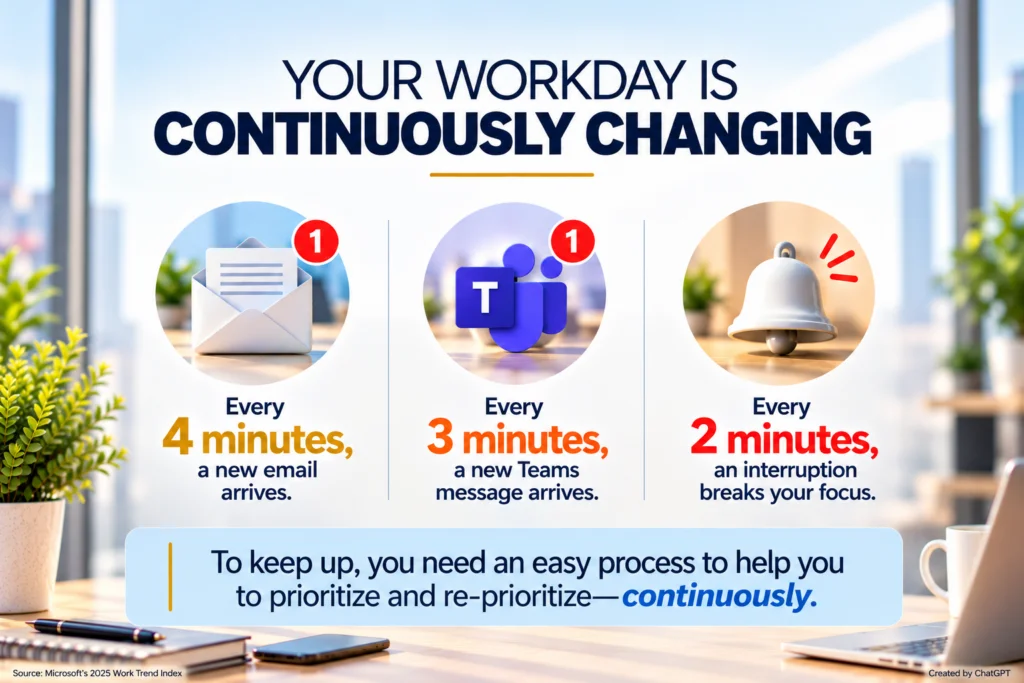
Your workday has changed. Your process for prioritizing has to change, too.For years, traditional time management advice has taught everyone how to make a list, choose a daily priority— alongside other important tasks—and work your plan throughout the day. But that advice assumed something important… That the plan would remain relatively stable. But today’s workday doesn’t work that way. And because of that, the plan you make is never stable. Consider the enormous volume of work coming at you every day, as explained by Microsoft’s 2025 Work Trend Index… In 2025, the average worker received 117 emails and 153 Teams messages every day. Almost half of employees at 48% as well as 52% of leaders say their work feels “chaotic” and “fragmented.” And it’s no wonder! For Microsoft’s highest-volume users, meetings, emails, and chats create digital interruptions roughly every TWO minutes during core work hours. |
|
|
|
| The problem, however, is that you don’t just have more work to do.
It’s that the work is coming from more places with greater speed, and each new task has the potential to change what deserves your attention the most. This is why “prioritizing” is not a once-and-done process you do at the start of the day. Prioritizing must be a continuous process, which is called “reprioritizing.” Your daily plan isn’t one that you should expect will stay put for the entire day. Reprioritizing is necessary to stay on top of what’s most important. It’s a skill you’ll want to practice. You need it to stay agile, responsive, and wise when deciding how to use your time. And there’s one critical distinction I’d like to make here…
“Reprioritizing” is very different from “reacting.”When you react to something in your workday—the person standing in your doorway with an urgent task, the email with the red exclamation point, an urgent phone call—the newest request tends to win your time and attention most often. But that’s not prioritizing. That’s allowing incoming work—or the squeakiest wheel—to determine where your attention goes next. Reprioritizing is different. Reprioritizing entails an ongoing review of what’s coming in, a comparison of new tasks to your existing tasks, and deliberate decisions to change your plan. These changes are prompted by incoming work that has now impacted the relative importance, timing, and/or sequence of your existing tasks for the day. Reprioritizing is about making decisions based on facts. And to make continuous informed decisions with both timeliness and accuracy, you need something most professionals don’t have these days… Visibility of the complete picture of your work.
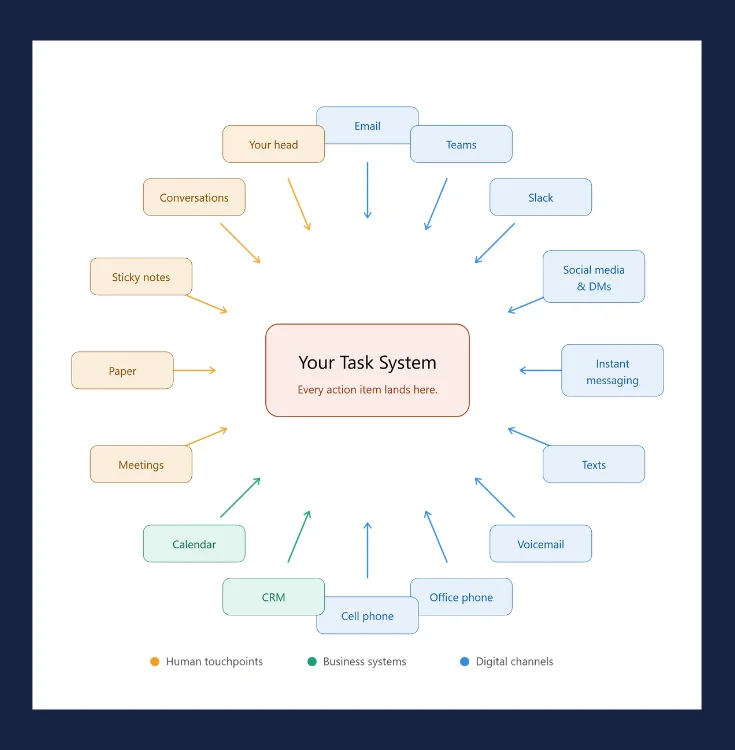
You can’t prioritize what you can’t see.Imagine trying to prioritize 12 tasks when you can only see 6. You might do a beautiful job of putting those visible 6 in the right order of importance, but what about… …the to-dos hidden on several other legal pads buried on your desk? With gaps in your plan, the order of importance of those 6 known tasks is entirely inaccurate. This is one of the biggest reasons why you feel like you’re spinning your wheels and not getting very far. It’s also why you’re always worried that you’re forgetting something. And you probably are. (Sorry.) This is happening not simply because you’re managing a heavy workload. But because you’re trying to manage it from too many places. These places are what I call the “sources of tasks” in your workday—the places where tasks appear. You find them in two ways: you’re either checking these sources throughout the day or you’re getting notifications: the rings, dings, and pings that alert you that something new has rolled in somewhere. The sources include (but are not limited to) email, texts, phone calls, voicemail, live conversations, meetings, IMs, DMs, CRM, project management software, and more. When you use a “tool” to try to keep up and keep track of everything, that is something else entirely. “Tools” include legal pads, notebooks, planners, the calendar, whiteboards, sticky notes, Excel/Google spreadsheets, Word/Google documents, task apps, and more. When you load up one or more “tools” with tasks, those “tools” becomes more “sources” you have to check, because you filled up each one of them with things to do. And one final frontier? Your brain. It’s both a source and a tool. When you have brand new ideas, your brain is the source. When you try to remember what you need to do or you suddenly remember something you should have done, you’re trying to use your brain as a tool. (And don’t count on that! With tasks flowing in from all of those sources, plus the many tools you may be using to stay on top of things, you get what I call “task scatter.” Responsibilities are spread out everywhere with no cohesive view and no way to identify what really needs your attention right now. This fragmentation causes friction. When a new task appears, it easily breaks your focus and attention. When focus and attention are broken, then you’re continuously searching, checking, forgetting, remembering, circling back, rethinking, re-doing, and worst of all: worrying. All through the day, you ask, “What am I forgetting?” And that takes an enormous amount of time and mental energy before you’ve even started doing the work.
|
|
|
|
The ‘Power of ONE’ changes everything.For more than 20 years, I’ve been an advocate of having ONE central, digital, complete task list to drive your day. You don’t need more tech. And AI isn’t going to reliably tell you the right things to do today. (Not at this point, at least, but maybe in the future.) What’s needed is one reliable location for all of your tasks and responsibilities. A complete system that… …brings together the actionable work arriving from all of those different sources. …allows you to do away with all of the tools you’ve been using to keep track of things to do. …supports not only what you plan to do today, but also every day into the future. …creates a strong plan that is also flexible so it keeps up with the changes in your day. …gives you 100% clarity of everything you’re responsible for, no matter where it came from or when you’ll do it. According to research by Visier, only 29% of leaders are confident in the planning capabilities of their workforce and the gap is costing their organizations “missed opportunities, delayed projects, and lost productivity.” They go on to say that their research, shared in their new report, “Strategic Workforce Planning in the AI Era,” 65% of leaders say “planning in one platform” is business critical and “unified data drives faster decisions.” I wholeheartedly agree. So, establishing that “one platform” is mission critical because of this next point. And if you’re still doing this, it’s only holding you back.
|
|
|
|
| Created by ChatGPT | |
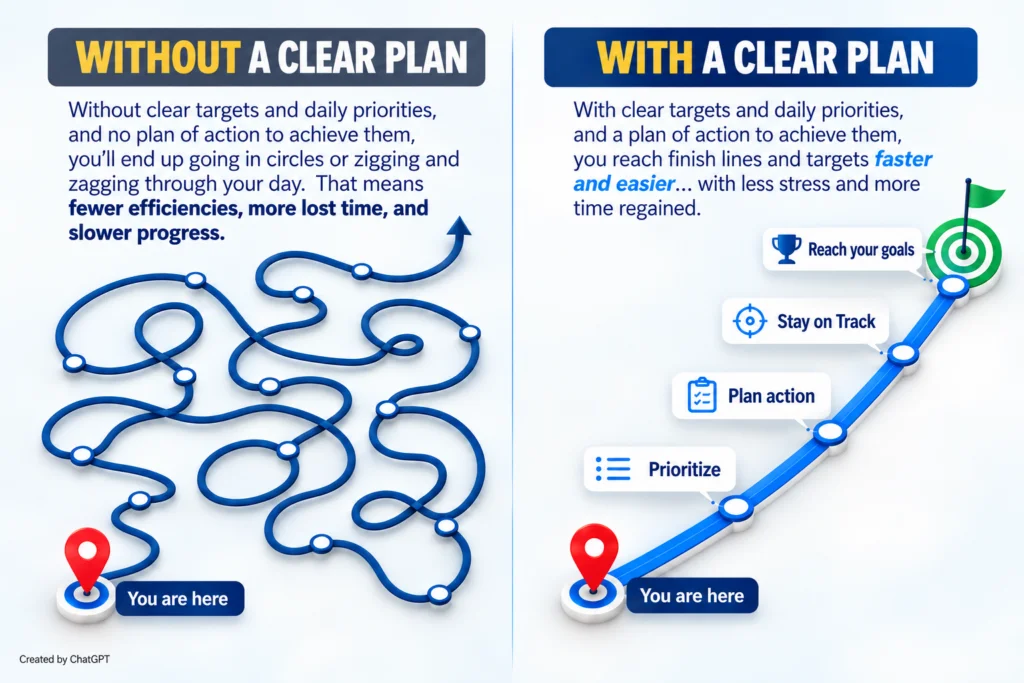
| And yes, you must wrap a plan around each task, given what you know today, right now. You have to start somewhere.
The plan is a strong place to start. And it will continuously change, because your day continuously changes. And that’s why you need a system that has flexibility built in so you can change with it. This is when something powerful happens. Instead of trying to remember all of your tasks, you can access them all in one place. Instead of trying to prioritize from fragmented lists, you can prioritize with more precision seeing the whole. Instead of automatically reacting to the newest task, you can compare it to your list of existing tasks. Instead of being frustrated that changing priorities destroyed your plan, you can intentionally change the plan. That’s the foundation for an easier, more efficient workday. It makes Operational Execution
Leadership determines where an organization is going.
|
|
|
|
|
|
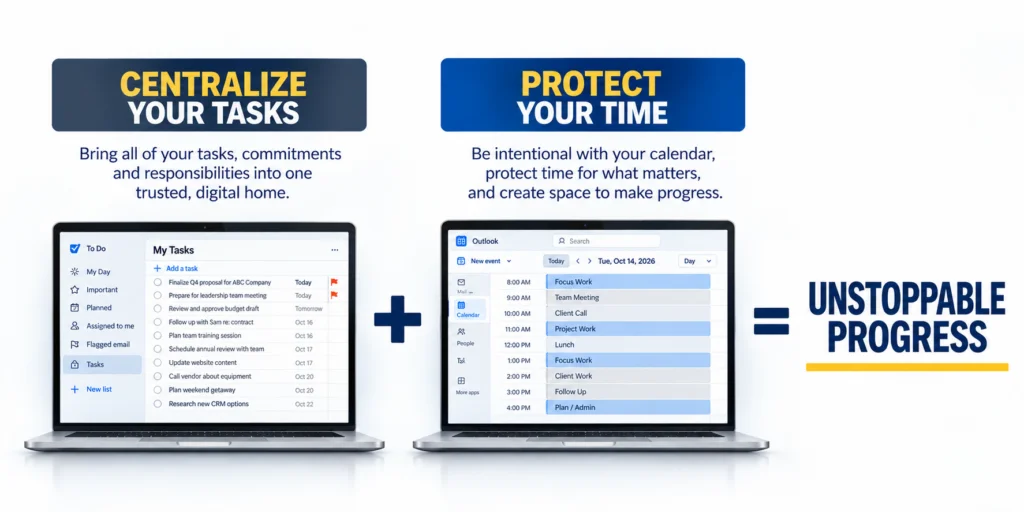
When everything feels urgent, don’t just move faster or work longer hours. Get a better view.This may be the most important shift of all. When you become frustrated and overwhelmed, the natural instinct is often to speed up. Answer faster. Work longer hours. Check things more often. Multitask harder. Stay online later. But research from Gallup consistently shows that unmanageable workloads and unreasonable time pressures are among the major factors associated with employee burnout. So when everything feels urgent, pushing yourself to move faster isn’t going to help. What will help is seeing a complete picture of what needs to be done. Because again, you can’t prioritize what you can’t see. And you can’t accomplish it when you can’t see it either. When tasks are hiding, lurking, or stuck somewhere, you won’t be able to prioritize with any accuracy. Also, you won’t be able to protect enough time when you don’t know what needs to be done. This leads to not being able to execute effectively, proactively, or productively when you’re only working on what you know about or what’s popping up in front of you. The modern workday will continue to change and get even faster. New requests will arrive. Meetings will move. Priorities will shift. Deadlines will change. The unexpected will happen. Your goal isn’t to prevent any of that. Your goal is to be ready for it. And the way to do that is to: Centralize your tasks to see a complete picture. When priorities change—and they will—you won’t have to abandon your original plan to react. You can simply reprioritize, redirect, and keep moving forward—with full awareness, confidence, and certainty. That’s how you stay ready. That’s how you remain in control. And that’s how you turn an unpredictable workday into a more productive one. That’s all for today. Hit Reply and let me know… When you hear “centralize your tasks,” what’s the biggest obstacle for you to do that successfully? Is it… Hit Reply and tell me what’s stopping you today. I answer every email. And when I answer yours, I’ll give you some tips to get started no matter which answer you choose. Until next time… Remember to make the most of your minutes. Greater productivity doesn’t mean you have to work harder or longer. It’s about how well you’re working and how efficient and effective you are with your time so you can have more time to enjoy LIFE. To your productivity and success, |
 )
)
 easy.
easy.