ChartMogul now lets teams build contact lists from billing data, review customer context and send personalized emails or sequences in one workflow.

ChartMogul has added contact lists, individual profiles and batch outreach tools to its subscription analytics platform. The change connects billing signals with customer communication: teams can identify people at accounts with a particular subscription status, check recent interactions and contact selected users without exporting the list to a separate tool.
That workflow may be useful when a team needs to respond to a change in account health. A past-due invoice, a scheduled cancellation or a recent downgrade can point to a conversation worth having, but someone still needs to identify the right contact and understand what the company has already discussed with them. ChartMogul’s new features bring those steps into one place.
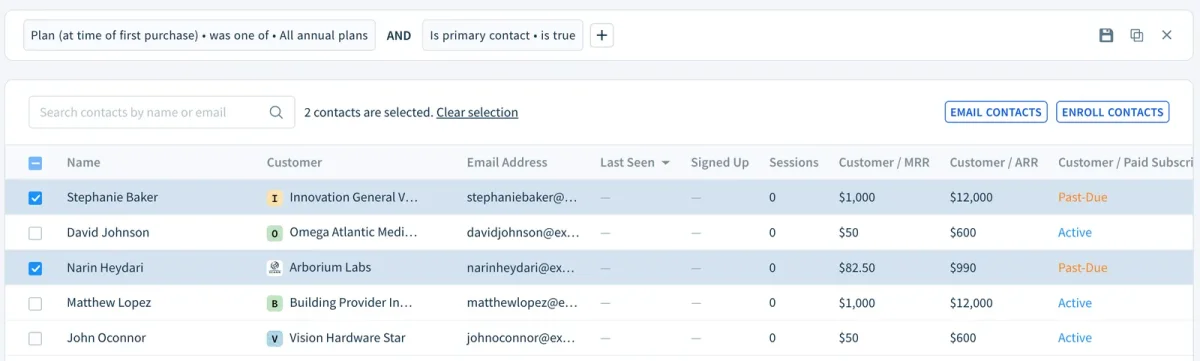
Lists built from billing and customer data
The Contacts view gathers contacts in one place and lets users filter them using contact, customer and subscription information. A team can save a filter as a list and return to it later. The saved list updates as its underlying data changes, so it can serve as a continuing work queue rather than a one-time export.
The filters allow teams to select contacts based on what is happening at their accounts. For example, a team could build a list of contacts at businesses with past-due invoices and reach out while the account is still active. Another list could identify contacts at accounts that have scheduled a cancellation, giving the team time to ask about the decision before the subscription ends.
Other possible uses include following up with contacts at accounts that downgraded the previous month, when the change may still be easy to discuss, or finding trial users at businesses with annual plans and more than $10,000 in annual recurring revenue. That last example combines trial, account and subscription details in a single filter.
ChartMogul says its filters can also include billing sources. A team could identify contacts at accounts billed through both Stripe and the App Store, with connected billing systems brought together for the list. That kind of view can help teams work from a customer’s account context even when payment information comes from more than one source.
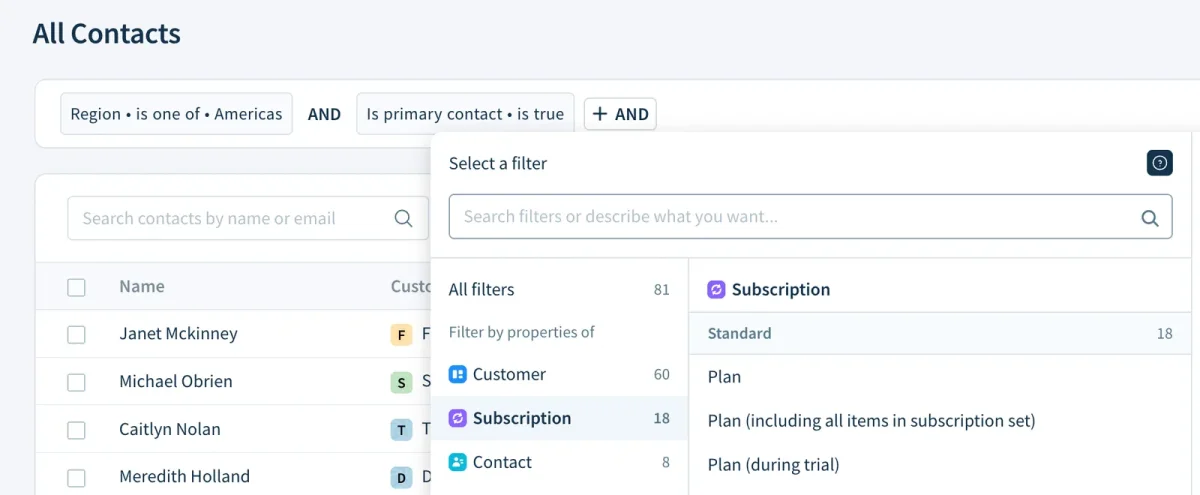
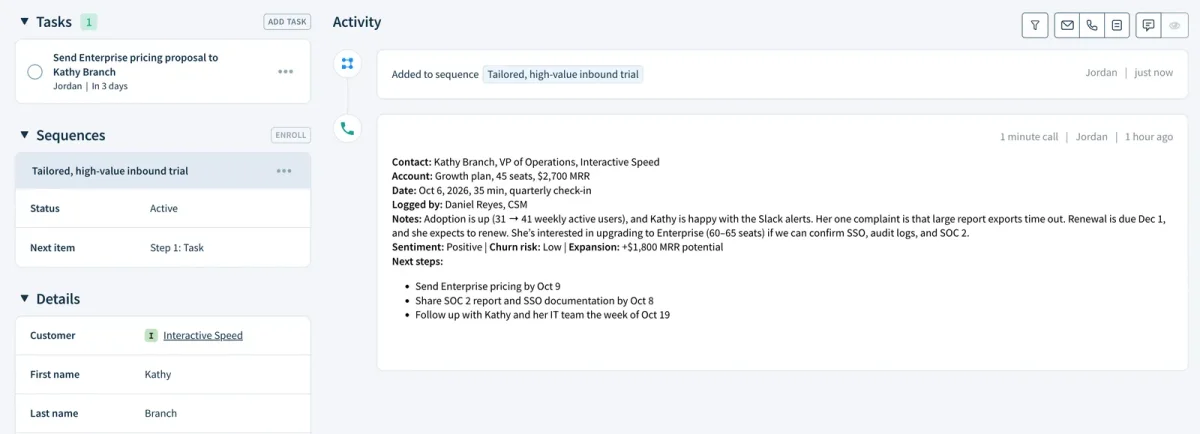
Profiles show communication history beside account status
Each contact profile brings together contact details, custom attributes, emails, notes, tasks and sequence activity. The profile also sits alongside subscription information for the person’s account. Before writing, a team member can check what the contact has already received, whether a task remains open and whether they are currently part of a sequence.
That context matters because a billing signal alone doesn’t explain a customer’s situation. A past-due invoice might call for a payment reminder, while an account with a scheduled cancellation may need a different conversation. Checking the profile first can help a team avoid sending an out-of-place message or repeating outreach that is already underway.
Batch email keeps messages individually addressed
Users can select contacts from a list and send each one an email using templates and placeholders. Those fields can populate names, company details and other attributes. ChartMogul also lets the sender preview and edit each message before it goes out.
The practical change is in preparation time: a team can work through a group of contacts without drafting every email from scratch or copying records into another system. The messages remain addressed to individuals, and the preview step gives the sender a chance to review how the personalized details appear before sending.

Sequences support repeat outreach
For contact work that calls for more than one message, users can enroll several people in a sequence at once. The examples ChartMogul gives include a short follow-up series for people who started a trial that week, a welcome sequence for contacts at new customer accounts, and check-ins for contacts at accounts that have gone quiet.
Batch enrollment can make recurring outreach more consistent, especially when a small team is handling many new trials or customer accounts. The profiles and account filters can help staff decide who belongs in a sequence; the sequence then organizes the follow-up after enrollment.
Product activity adds timing context
Companies using ChartMogul.js already have product activity details in ChartMogul, including users’ last-seen dates, sign-up dates and session counts. Those details can help teams distinguish between trial users who are actively returning and people who have not logged in recently.
That distinction can shape the timing and content of outreach. Someone who used the product yesterday may need a different note from someone who has been away for a week. The activity data gives the team another signal to consider alongside account and subscription status.
A workflow for revenue-related follow-up
A team might save a list of people active in the product this week whose accounts have past-due invoices, review a few profiles for open tasks or recent conversations, then enroll the list in a payment follow-up sequence. Separately, it could create a list of contacts at accounts that scheduled cancellations and send them individually personalized check-ins.
The workflow links account signals to the people who can respond, while keeping customer history visible during preparation. Contact lists, profiles and batch actions are available in ChartMogul’s Contacts area. For teams adopting the features, the useful starting point is a recurring customer situation—such as trial follow-up or payment recovery—and a saved list that keeps the relevant contacts current.
Open Contacts in ChartMogul to build a list. ChartMogul says the contact tools are available now.